
How to Use the Littmann CORE Digital Stethoscope: A Complete Step-By-Step Guide

The 3M™ Littmann® CORE Digital Stethoscope is one of the most advanced auscultation tools available today, combining Littmann’s trusted acoustic performance with powerful digital features such as up to 40× amplification, active noise cancellation, Bluetooth® connectivity, and app-based recording.
Despite its sophisticated technology, the CORE is designed to be intuitive, comfortable, and easy to use in fast-paced clinical environments. Whether you're unboxing your CORE for the first time or transitioning from a traditional stethoscope, this guide will walk you through exactly how to use every feature so you can get the most out of your investment from day one.
Important: The Littmann CORE is designed for use on patients by clinicians in clinical and non-clinical environments. It is not intended for self-diagnosis.
What's Included with the Littmann CORE Digital Stethoscope?
When you purchase a Littmann CORE Digital Stethoscope, your box includes:
- Fully assembled 3M™ Littmann® CORE Digital Stethoscope
(3M Littmann Cardiology IV + Eko CORE digital attachment) - Additional set of 3M Littmann Snap Tight Soft-Sealing Eartips (small)
- Nonchill bell sleve
- USB charging cable
- Quick Start Guide
This is everything you need to start using your Littmann CORE in both analog and digital modes.
Littmann CORE Digital Stethoscope Product Overview & Setup Video:
Getting Started: Understanding the Dual-Mode Design
One of the Littmann CORE Digital Stethoscope's biggest advantages is that it can be used in two different modes:
Analog Mode (Traditional Listening)
In analog mode, the CORE behaves like a classic Littmann Cardiology stethoscope:
- No power required
- No electronics active
- Purely acoustic sound transmission
If the digital module is powered off, you’re automatically in analog mode.
Digital Mode (Amplified, Noise-Cancelled Listening)
Digital mode activates the CORE’s full set of advanced electronic stethoscope features:
- Up to 40x amplification over an unamplified acoustic stethoscope
- Active noise cancellation (ANC) to reduce ambient noise
- Bluetooth® connectivity to the Eko App
- Recording and wireless listening through a compatible device
You can switch between analog and digital mode at any time, making the CORE highly adaptable to your patient, environment, and workflow.
Step 1: Charging and Powering On the Digital Module
Before using digital features for the first time, fully charge your CORE.
How to Charge
- Plug the micro USB cable into the port on the digital module
- Connect the USB-A end to a UL-certified or CE-marked 5V wall charger.
- LED indications:
- Blinking yellow – low battery
- Solid yellow – charging
- Solid green – fully charged
A full charge typically takes about 2-2.5 hours and provides up to 8 hours of continuous digital use.
Note: The CORE will not turn on or connect to the Eko App while it is plugged in and charging.
Powering On the Digital Module
The CORE uses a power slider/toggle on the side of the digital attachment:
ON: Depress the power slider so it is flush with the volume buttons.
- A while blinking light indicates CORE is on and ready for amplified listening and pairing.
OFF: Slide the toggle so it protrudes from the surface.
- The light turns off and the stethoscope functions as a standard analog Littmann.
Standby Mode
To conserve battery, the CORE automatically enters standby after about 5 minutes of inactivity:
- The LED turns off
- The toggle remains in the ON position
To wake it:
- Move the toggle briefly to OFF
- Then back to ON
- The white LED will reappear
Step 2: Switching Between Analog and Digital Modes
Switching modes is simple and can be done in the middle of an assessment.
- Digital mode: Toggle ON → LED blinking white → amplified, filtered audio
- Analog mode: Toggle OFF → LED off → classic acoustic listening
This flexibility is helpful when:
- You need extra amplification for faint murmurs or subtle lung sounds
- You want simple acoustic listening for routine vitals
- You are teaching, recording, or sharing cases
- You want to preserve battery during slower periods
The dual-mode system lets you use the CORE exactly like a traditional stethoscope when you want to, and as a powerful digital tool when you need more.
Step 3: Adjusting Amplification Levels
Once digital mode is active, you can use the + / – volume buttons on the module to control amplification.
- The CORE offers 7 volume steps
- Amplification can reach up to 40x that of a standard acoustic stethoscope (when listening through the eartips)
When Higher Amplification Is Useful
- Faint or subtle heart murmurs
- Soft lung crackles or diminished breath sounds
- Noisy environments (busy wards, ED, EMS)
- Larger patients or those with increased chest wall thickness
- Listening through clothing in emergencies (when appropriate)
Tip: Start at a medium volume and adjust upward carefully to avoid overwhelming your ears with loud sounds like closing valves or high-flow respiratory noise.

Step 4: Activating and Managing Active Noise Cancellation (ANC)
The Littmann CORE electronic stethoscope includes active noise cancellation to help suppress ambient noise and highlight body sounds.
- ANC is controlled through the Eko App
- Once enabled in the app, ANC will remain active with digital mode until you toggle it off
ANC Is Especially Helpful In:
- Emergency departments and trauma bays
- Ambulances and paramedic settings
- Busy inpatient or ICU environments
- Pediatric units and shared patient rooms
- Long-term care facilities or noisy hallways
You’ll notice that heart and lung sounds become more prominent, while background chatter and equipment noise fade into the background.
Step 5: Using the Dual-Sided Chestpiece
The Littmann CORE uses the dual-sided Cardiology IV chestpiece, giving you flexibility for different patients and sound types.
Chestpiece Sides
- Adult diaphragm (larger side) - general assessments and most adult patients
- Pediatric diaphragm / open bell (smaller side):
- Use with diaphragm for children, thin adults, or smaller auscultation windows
- Remove the pediatric diaphragm and apply the non-chill bell sleeve to convert into an open bell, ideal for low-frequency sounds
Choosing the Right Side
- Use the adult diaphragm for routine heart, lung, and bowel assessments.
- Use the pediatric diaphragm for:
- Pediatric patients
- Low-BMI adults
- Areas with limited space between ribs
- Use the open bell for:
- Low-frequency murmurs
- Some gallops (S3, S4)
- Certain vascular sounds, as recommended by your clinical protocols
To switch sides, simply rotate the chestpiece. You’ll feel. A slight click when each side is indexed/opened.

Step 6: Pairing the Littmann CORE with the Eko App
To unlock recording, visualization, telehealth, and data management features, pair your stethoscope with the Eko App.
App Download
- iOS: Apple App Store®
- Android: Google Play Store®
Your mobile device must support:
- Bluetooth Low Energy (BLE / Bluetooth 4.0 or higher)
- iOS 12.0+ or Android 8.0+
Pairing Instructions (Provider or Patient Workflow)
- Turn on Bluetooth on your phone or tablet.
- Enable digital mode on the CORE (toggle ON, white LED blinking).
- Open the Eko App and log in or create an account.
- Tap Connect Device or follow the pairing prompts.
- Select your Littmann CORE from the list and tap Pair.
- Wait a few seconds for confirmation in the app.
Tip: Keep your CORE and phone within 15 feet and avoid strong RF sources (routers, RFID gates, etc.) that may cause a “Poor Bluetooth Signal” warning.
Once paired, you can start listening wirelessly, recording, and working within your patient database.
Step 7: Recording Heart and Lung Sounds
Recording with the Littmann CORE through the Eko App is straightforward and extremely powerful for:
- Teaching and training
- Telemedicine and remote consults
- Case documentation and follow-up
- Sharing rare or complex findings
How to Record
- Open the Eko App and ensure your CORE is connected.
- Select Record or start a recording from the patient profile screen.
- Place the chestpiece on standard auscultation points:
- For heart: traditional valve areas on the anterior chest
- For lungs: anterior, lateral, and posterior fields as appropriate
- Press the record button in the app (or blue button on supported devices).
- After auscultation, press Stop.
- Save the recording to a patient profile or case file.
- (Optional) Add notes or labels to the recording for future reference.
You can listen to recordings later, compare serial exams, or share them securely with other clinicians.
Step 8: Viewing Waveforms, Filters, and Visualizing Sound
One of the most educational features of using the CORE with the Eko App is the ability to visualize sound.
In the app you can:
- View waveforms of heart and lung sounds in real time
- See timing and intensity of S1, S2, and murmurs
- Interpret respiratory patterns and irregularities
- Use frequency filters to emphasize heart vs. lung vs. other body sounds
This is especially useful for:
- Medical students and residents learning auscultation
- Clinicians refining their assessment of complex murmurs
- Teaching advanced cardiac and respiratory exam techniques

Step 9: Sharing Sounds and Colleagues or Specialists
The Eko App makes it easy to securely share recordings while supporting privacy requirements (e.g., HIPAA compliance in appropriate regions).
You can share via:
- Encrypted links
- EHR integrations (where supported)
- Cloud-based storage within your Eko account
This is extremely valuable when:
- Consulting with cardiologists or pulmonologists
- Sharing unusual or complex findings
- Participating in interdisciplinary case reviews
- Teaching learners with real patient examples
Some regions also support AI-powered cardiac analysis (subscription-based), which can help flag potential abnormalities for further clinical assessment.
Step 10: Cleaning and Caring for Your Littmann CORE
Even though the CORE includes sensitive digital components, caring for it is simple and familiar if you already use a Littmann stethoscope.
Cleaning Guidelines
- Clean between every patient use.
- Wipe all external parts with 70% isopropyl alcohol wipes.
- You may also use a mild soap and water wipe on tubing and chestpiece; dry thoroughly.
- Avoid pens, markers, and printed materials touching the tubing to prevent staining.
Do NOT:
- Immerse any part of the device in liquid
- Autoclave or subject it to high-pressure sterilization
- Expose it to extreme heat or cold
Under normal conditions, you do not need to remove the CORE from the tubing. If you do:
- Gently pull the stethoscope tubing off the metal stems of the CORE attachment.
- Clean each component with 70% alcohol wipes.
- Reassemble by firmly reinserting the metal stems into the tubing.
Environmental Conditions
- Operating temperature: approx. -30°C to 40°C
- Storage/transport: approx. -40°C to 55°C
- Avoid extreme temperatures, solvents, and oils that could damage the lithium-ion battery or tubing.
Practical Tips for Everyday Use
To get the most from your Littmann CORE Digital Stethoscope:
- Start with medium amplification and adjust up or down as needed.
- Use analog mode for quick vitals and digital mode for complex assessments or noisy environments.
- Enable ANC + amplification together when working in particular loud settings.
- Keep an eye on the LED:
- Blinking yellow → charge soon
- Solid yellow → charging
- Solid green → fully charged
- Consider keeping a charger at work if you have long or unpredictable shifts.
- Clean the diaphragm and eartips between patients to maintain sound clarity and infection control.
- Use the waveform view and recordings when teaching students—they’ll learn faster with both audio and visual cues.
Why the Littmann CORE Is So Easy to Use
The Littmann CORE was designed with busy clinicians in mind:
- Familiar Littmann Cardiology IV chestpiece and feel
- Single-toggle switch between analog and digital modes
- Intuitive + / - volume controls
- Straightforward pairing with the Eko App
- No complex setup or steep learning curve
Most clinicians feel comfortable using both modes within minutes of handling the device, making it an ideal way to introduce digital auscultation into everyday practice.
Frequently Asked Questions About Using the Littmann CORE Stethoscope
- iOS 12.0+ (iPhone, iPad, iPod Touch)
- Android 8.0+ with Bluetooth 4.0 or higher
The LED will show:
- Blinking yellow – low battery
- Solid yellow – charging
- Solid green – fully charged
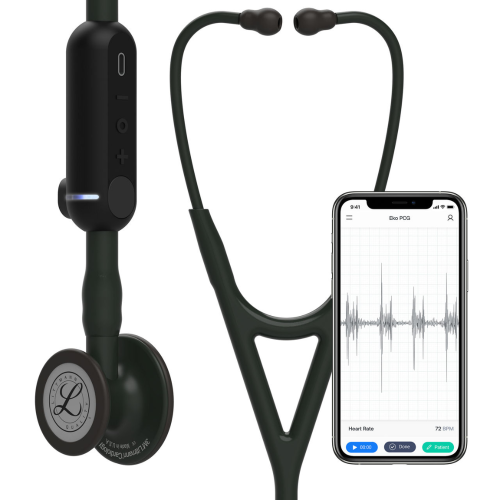

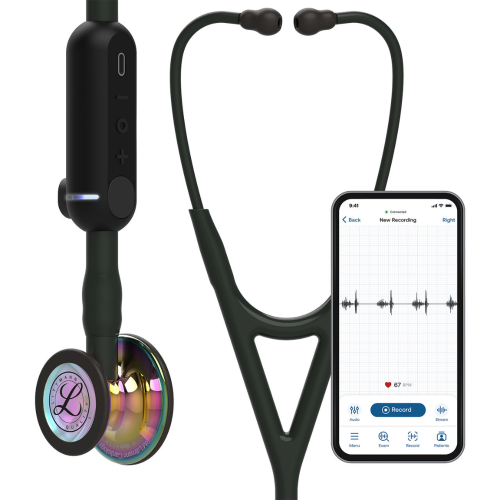
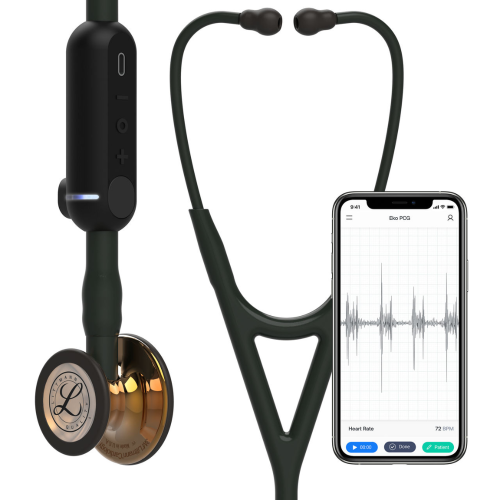
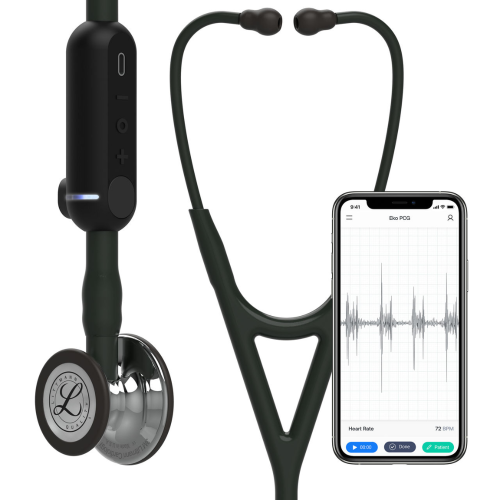
The 3M™ Littmann® CORE Digital Stethoscope is one of the most advanced auscultation tools available today, combining Littmann’s trusted acoustic performance with powerful digital features such as up to 40× amplification, active noise cancellation, Bluetooth® connectivity, and app-based recording.
Despite its sophisticated technology, the CORE is designed to be intuitive, comfortable, and easy to use in fast-paced clinical environments. Whether you're unboxing your CORE for the first time or transitioning from a traditional stethoscope, this guide will walk you through exactly how to use every feature so you can get the most out of your investment from day one.
Important: The Littmann CORE is designed for use on patients by clinicians in clinical and non-clinical environments. It is not intended for self-diagnosis.
What's Included with the Littmann CORE Digital Stethoscope?
When you purchase a Littmann CORE Digital Stethoscope, your box includes:
- Fully assembled 3M™ Littmann® CORE Digital Stethoscope
(3M Littmann Cardiology IV + Eko CORE digital attachment) - Additional set of 3M Littmann Snap Tight Soft-Sealing Eartips (small)
- Nonchill bell sleve
- USB charging cable
- Quick Start Guide
This is everything you need to start using your Littmann CORE in both analog and digital modes.
Littmann CORE Digital Stethoscope Product Overview & Setup Video:
Getting Started: Understanding the Dual-Mode Design
One of the Littmann CORE Digital Stethoscope's biggest advantages is that it can be used in two different modes:
Analog Mode (Traditional Listening)
In analog mode, the CORE behaves like a classic Littmann Cardiology stethoscope:
- No power required
- No electronics active
- Purely acoustic sound transmission
If the digital module is powered off, you’re automatically in analog mode.
Digital Mode (Amplified, Noise-Cancelled Listening)
Digital mode activates the CORE’s full set of advanced electronic stethoscope features:
- Up to 40x amplification over an unamplified acoustic stethoscope
- Active noise cancellation (ANC) to reduce ambient noise
- Bluetooth® connectivity to the Eko App
- Recording and wireless listening through a compatible device
You can switch between analog and digital mode at any time, making the CORE highly adaptable to your patient, environment, and workflow.
Step 1: Charging and Powering On the Digital Module
Before using digital features for the first time, fully charge your CORE.
How to Charge
- Plug the micro USB cable into the port on the digital module
- Connect the USB-A end to a UL-certified or CE-marked 5V wall charger.
- LED indications:
- Blinking yellow – low battery
- Solid yellow – charging
- Solid green – fully charged
A full charge typically takes about 2-2.5 hours and provides up to 8 hours of continuous digital use.
Note: The CORE will not turn on or connect to the Eko App while it is plugged in and charging.
Powering On the Digital Module
The CORE uses a power slider/toggle on the side of the digital attachment:
ON: Depress the power slider so it is flush with the volume buttons.
- A while blinking light indicates CORE is on and ready for amplified listening and pairing.
OFF: Slide the toggle so it protrudes from the surface.
- The light turns off and the stethoscope functions as a standard analog Littmann.
Standby Mode
To conserve battery, the CORE automatically enters standby after about 5 minutes of inactivity:
- The LED turns off
- The toggle remains in the ON position
To wake it:
- Move the toggle briefly to OFF
- Then back to ON
- The white LED will reappear
Step 2: Switching Between Analog and Digital Modes
Switching modes is simple and can be done in the middle of an assessment.
- Digital mode: Toggle ON → LED blinking white → amplified, filtered audio
- Analog mode: Toggle OFF → LED off → classic acoustic listening
This flexibility is helpful when:
- You need extra amplification for faint murmurs or subtle lung sounds
- You want simple acoustic listening for routine vitals
- You are teaching, recording, or sharing cases
- You want to preserve battery during slower periods
The dual-mode system lets you use the CORE exactly like a traditional stethoscope when you want to, and as a powerful digital tool when you need more.
Step 3: Adjusting Amplification Levels
Once digital mode is active, you can use the + / – volume buttons on the module to control amplification.
- The CORE offers 7 volume steps
- Amplification can reach up to 40x that of a standard acoustic stethoscope (when listening through the eartips)
When Higher Amplification Is Useful
- Faint or subtle heart murmurs
- Soft lung crackles or diminished breath sounds
- Noisy environments (busy wards, ED, EMS)
- Larger patients or those with increased chest wall thickness
- Listening through clothing in emergencies (when appropriate)
Tip: Start at a medium volume and adjust upward carefully to avoid overwhelming your ears with loud sounds like closing valves or high-flow respiratory noise.
Step 4: Activating and Managing Active Noise Cancellation (ANC)
The Littmann CORE electronic stethoscope includes active noise cancellation to help suppress ambient noise and highlight body sounds.
- ANC is controlled through the Eko App
- Once enabled in the app, ANC will remain active with digital mode until you toggle it off
ANC Is Especially Helpful In:
- Emergency departments and trauma bays
- Ambulances and paramedic settings
- Busy inpatient or ICU environments
- Pediatric units and shared patient rooms
- Long-term care facilities or noisy hallways
You’ll notice that heart and lung sounds become more prominent, while background chatter and equipment noise fade into the background.
Step 5: Using the Dual-Sided Chestpiece
The Littmann CORE uses the dual-sided Cardiology IV chestpiece, giving you flexibility for different patients and sound types.
Chestpiece Sides
- Adult diaphragm (larger side) - general assessments and most adult patients
- Pediatric diaphragm / open bell (smaller side):
- Use with diaphragm for children, thin adults, or smaller auscultation windows
- Remove the pediatric diaphragm and apply the non-chill bell sleeve to convert into an open bell, ideal for low-frequency sounds
Choosing the Right Side
- Use the adult diaphragm for routine heart, lung, and bowel assessments.
- Use the pediatric diaphragm for:
- Pediatric patients
- Low-BMI adults
- Areas with limited space between ribs
- Use the open bell for:
- Low-frequency murmurs
- Some gallops (S3, S4)
- Certain vascular sounds, as recommended by your clinical protocols
To switch sides, simply rotate the chestpiece. You’ll feel. A slight click when each side is indexed/opened.
Step 6: Pairing the Littmann CORE with the Eko App
To unlock recording, visualization, telehealth, and data management features, pair your stethoscope with the Eko App.
App Download
- iOS: Apple App Store®
- Android: Google Play Store®
Your mobile device must support:
- Bluetooth Low Energy (BLE / Bluetooth 4.0 or higher)
- iOS 12.0+ or Android 8.0+
Pairing Instructions (Provider or Patient Workflow)
- Turn on Bluetooth on your phone or tablet.
- Enable digital mode on the CORE (toggle ON, white LED blinking).
- Open the Eko App and log in or create an account.
- Tap Connect Device or follow the pairing prompts.
- Select your Littmann CORE from the list and tap Pair.
- Wait a few seconds for confirmation in the app.
Tip: Keep your CORE and phone within 15 feet and avoid strong RF sources (routers, RFID gates, etc.) that may cause a “Poor Bluetooth Signal” warning.
Once paired, you can start listening wirelessly, recording, and working within your patient database.
Step 7: Recording Heart and Lung Sounds
Recording with the Littmann CORE through the Eko App is straightforward and extremely powerful for:
- Teaching and training
- Telemedicine and remote consults
- Case documentation and follow-up
- Sharing rare or complex findings
How to Record
- Open the Eko App and ensure your CORE is connected.
- Select Record or start a recording from the patient profile screen.
- Place the chestpiece on standard auscultation points:
- For heart: traditional valve areas on the anterior chest
- For lungs: anterior, lateral, and posterior fields as appropriate
- Press the record button in the app (or blue button on supported devices).
- After auscultation, press Stop.
- Save the recording to a patient profile or case file.
- (Optional) Add notes or labels to the recording for future reference.
You can listen to recordings later, compare serial exams, or share them securely with other clinicians.
Step 8: Viewing Waveforms, Filters, and Visualizing Sound
One of the most educational features of using the CORE with the Eko App is the ability to visualize sound.
In the app you can:
- View waveforms of heart and lung sounds in real time
- See timing and intensity of S1, S2, and murmurs
- Interpret respiratory patterns and irregularities
- Use frequency filters to emphasize heart vs. lung vs. other body sounds
This is especially useful for:
- Medical students and residents learning auscultation
- Clinicians refining their assessment of complex murmurs
- Teaching advanced cardiac and respiratory exam techniques
Step 9: Sharing Sounds and Colleagues or Specialists
The Eko App makes it easy to securely share recordings while supporting privacy requirements (e.g., HIPAA compliance in appropriate regions).
You can share via:
- Encrypted links
- EHR integrations (where supported)
- Cloud-based storage within your Eko account
This is extremely valuable when:
- Consulting with cardiologists or pulmonologists
- Sharing unusual or complex findings
- Participating in interdisciplinary case reviews
- Teaching learners with real patient examples
Some regions also support AI-powered cardiac analysis (subscription-based), which can help flag potential abnormalities for further clinical assessment.
Step 10: Cleaning and Caring for Your Littmann CORE
Even though the CORE includes sensitive digital components, caring for it is simple and familiar if you already use a Littmann stethoscope.
Cleaning Guidelines
- Clean between every patient use.
- Wipe all external parts with 70% isopropyl alcohol wipes.
- You may also use a mild soap and water wipe on tubing and chestpiece; dry thoroughly.
- Avoid pens, markers, and printed materials touching the tubing to prevent staining.
Do NOT:
- Immerse any part of the device in liquid
- Autoclave or subject it to high-pressure sterilization
- Expose it to extreme heat or cold
Under normal conditions, you do not need to remove the CORE from the tubing. If you do:
- Gently pull the stethoscope tubing off the metal stems of the CORE attachment.
- Clean each component with 70% alcohol wipes.
- Reassemble by firmly reinserting the metal stems into the tubing.
Environmental Conditions
- Operating temperature: approx. -30°C to 40°C
- Storage/transport: approx. -40°C to 55°C
- Avoid extreme temperatures, solvents, and oils that could damage the lithium-ion battery or tubing.
Practical Tips for Everyday Use
To get the most from your Littmann CORE Digital Stethoscope:
- Start with medium amplification and adjust up or down as needed.
- Use analog mode for quick vitals and digital mode for complex assessments or noisy environments.
- Enable ANC + amplification together when working in particular loud settings.
- Keep an eye on the LED:
- Blinking yellow → charge soon
- Solid yellow → charging
- Solid green → fully charged
- Consider keeping a charger at work if you have long or unpredictable shifts.
- Clean the diaphragm and eartips between patients to maintain sound clarity and infection control.
- Use the waveform view and recordings when teaching students—they’ll learn faster with both audio and visual cues.
Why the Littmann CORE Is So Easy to Use
The Littmann CORE was designed with busy clinicians in mind:
- Familiar Littmann Cardiology IV chestpiece and feel
- Single-toggle switch between analog and digital modes
- Intuitive + / - volume controls
- Straightforward pairing with the Eko App
- No complex setup or steep learning curve
Most clinicians feel comfortable using both modes within minutes of handling the device, making it an ideal way to introduce digital auscultation into everyday practice.
Frequently Asked Questions About Using the Littmann CORE Stethoscope
- iOS 12.0+ (iPhone, iPad, iPod Touch)
- Android 8.0+ with Bluetooth 4.0 or higher
The LED will show:
- Blinking yellow – low battery
- Solid yellow – charging
- Solid green – fully charged
